Alternative
A Google Alerts alternative built for teams, not inboxes
Google Alerts is documented as an email notification service: you enter a topic and Google emails you matching results. That works for one person watching one topic. It works less well when a whole team needs the same coverage, in one place, filtered.
NewsCatch delivers monitored coverage into a Slack or Microsoft Teams channel, scores every article for relevance before it is sent, and routes different topics to different channels.
What people are usually trying to fix
Three complaints come up almost every time someone looks for an alternative.
- 1
Monitoring lives in one inbox
Alerts arrive as email to the person who set them up. Sharing means forwarding, and the coverage is invisible to everyone else.
- 2
No relevance control
A topic either matches or it doesn't. There is no score to raise when the volume is too high and the matches are too loose.
- 3
Nowhere to route by topic
Brand coverage, competitor news and industry reading all land in the same place, so nobody triages them consistently.
Documented native capabilities, side by side
This table describes what each product does natively according to Google's own public help documentation. Where a capability is not documented, the cell says exactly that.
| Capability | Google Alerts | NewsCatch |
|---|---|---|
| Documented native delivery | Slack and Microsoft Teams channels | |
| Topic and keyword monitoring | Yes | Yes |
| Delivery frequency controls | Yes — as-it-happens, daily or weekly | Yes — real time or scheduled digest |
| Source, language and region options | Yes — documented sources, language, region and result-count options | Yes — you choose the exact publications and feeds monitored |
| Explicit per-article relevance score | Not documented as a native feature | Yes — visible score with an adjustable minimum threshold |
| Routing different topics to different destinations | Not documented as a native feature | Yes — one rule per keyword set and channel |
| Shared monitoring workspace for a team | Not documented as a native feature | Yes — shared projects, saved articles and channel delivery |
| De-duplication of the same story across outlets | Not documented as a native feature | Yes — near-duplicates collapsed to one canonical article |
| Quiet hours | Not documented as a native feature | Yes |
| Price | Free | Free 14-day founder-assisted pilot, then agreed commercially |
Google Alerts column describes capabilities documented in Google's public help pages. Where a capability is not described there, the cell says so rather than claiming it is impossible — third-party workflows may cover it. Last verified 2 August 2026.
Want the longer version? Read the full NewsCatch vs Google Alerts comparison.
Delivery into the channel your team already reads
The single biggest difference in practice is where the coverage ends up.
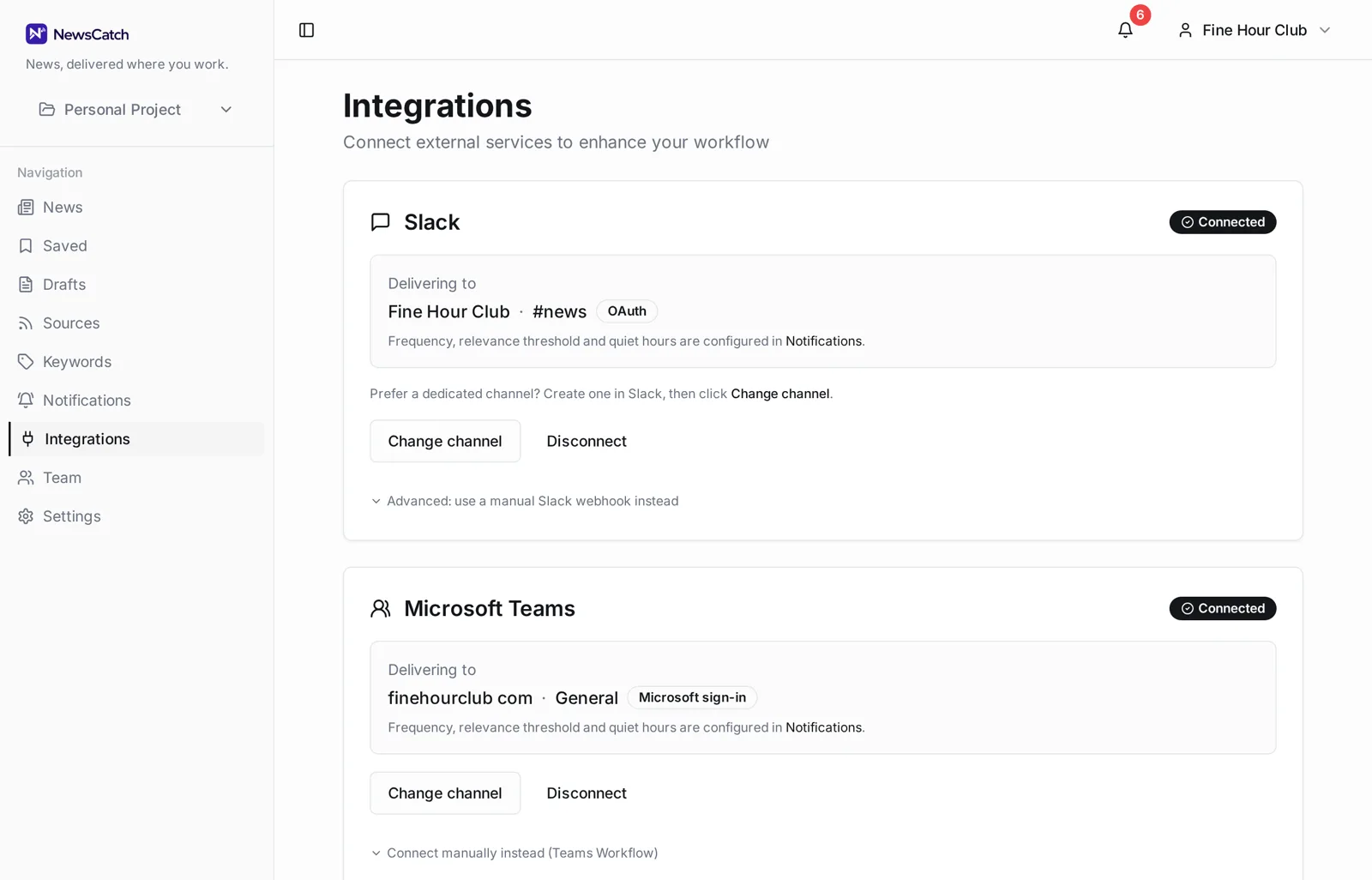
Connect Slack or Microsoft Teams once and pick a destination channel. Everyone in the channel sees the same coverage at the same time, can react to it in place, and nobody has to forward anything.
- Slack channel delivery
- Microsoft Teams channel delivery
- Different topics to different channels
- Real-time or daily digest
- Quiet hours
A relevance bar you can actually move
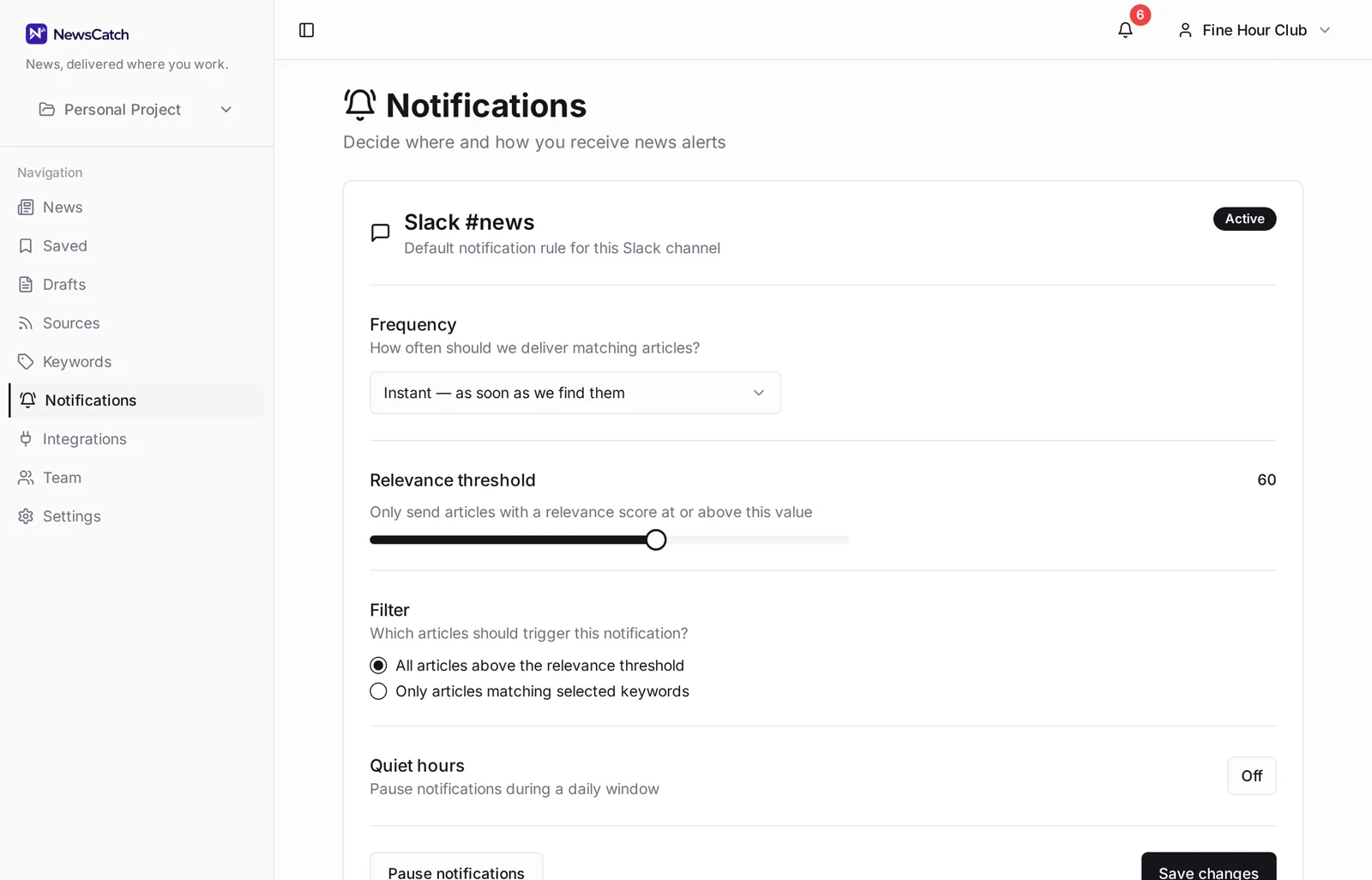
Filtering is a setting rather than a hope.
Every article gets a relevance score against your keywords and monitored topics. Each notification rule has a minimum score, so if a channel is too noisy you raise the bar and the volume drops immediately. Duplicate coverage of the same story is collapsed before delivery.
Common questions when switching
Can I keep using Google Alerts alongside NewsCatch?
Yes, and during a pilot that is a sensible way to compare them. Nothing about NewsCatch requires turning Alerts off.
Can Google Alerts be connected to Slack somehow?
Its documented native delivery is email, and various third-party automation tools can forward email into chat. We do not claim it is impossible — the difference is that NewsCatch treats channel delivery, routing and relevance filtering as native features rather than something you assemble.
Do I need to re-enter all my alert topics?
You will re-create them as keyword sets, which is usually a copy-paste job. During a founder-assisted pilot we do that part with you.
Is NewsCatch free?
The 14-day pilot is free and does not need a card. Commercial terms come after, based on how you actually use it.
What sources does NewsCatch monitor?
Publications and feeds you choose, plus sources suggested for the topics you describe. You always see and control the source list.
Related
Ready to try it? See how the 14-day pilot works.